Magento to Shopify migration is rarely driven by a single problem. More often, businesses reach a point where maintaining their Magento store requires increasing investments in infrastructure, development, security updates, and ongoing support.
At the same time, customer expectations continue to grow. Faster storefronts, easier content management, better integrations, and shorter release cycles have become standard requirements rather than competitive advantages.
Moving from Magento to Shopify is not simply a data transfer project. Product catalogs, customer records, order history, integrations, SEO assets, and business processes all need careful planning to avoid disruptions after launch.
Key Insights for 2026
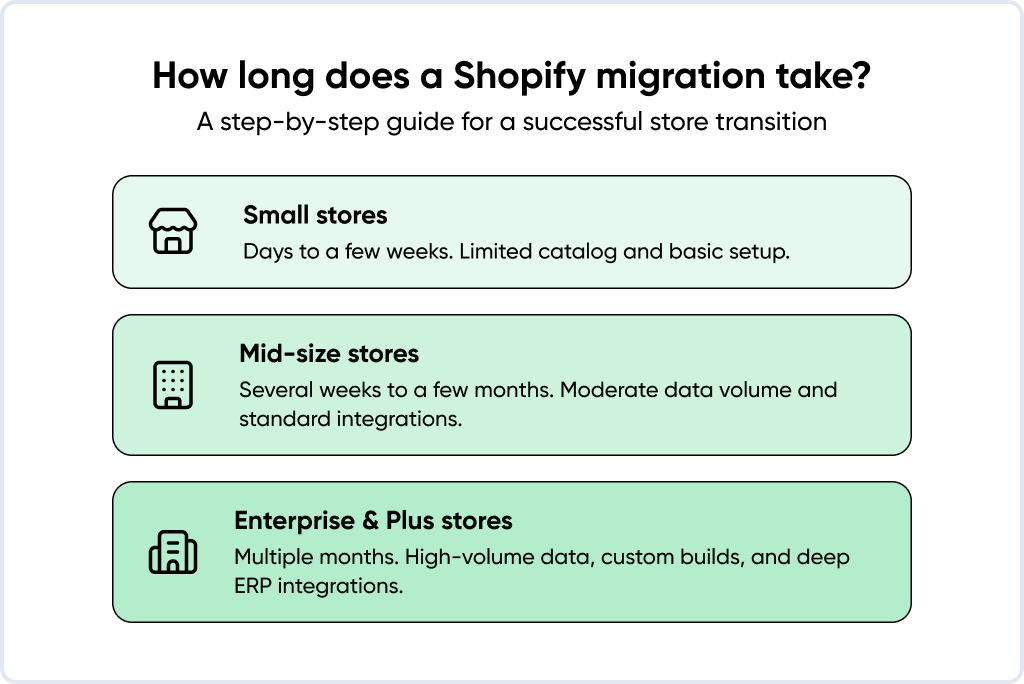
- Mid-size stores: 8 to 12 weeks. Complex catalogs with custom logic: 4 to 6 months. Both are real numbers.
- Passwords, some B2B logic, and your entire extension stack don’t transfer. You need a plan for each.
- Redirect mapping is build-phase work. Doing it during launch week is already too late.
- Shopify Plus B2B in 2025-2026 is not the same product that merchants dismissed two years ago.
Why Merchants Migrate from Magento to Shopify in 2026
There’s rarely one reason. It’s usually a combination that tips the scale:
- The total cost of ownership keeps growing. On Magento, you’re paying for servers, security patches, DevOps time, and a developer on call for things that shouldn’t require a developer. Shopify Plus takes most of that off your plate. The TCO gap over three years is typically 30 to 50% in Shopify’s favor for mid-market brands.
- Launch cycles are too slow. A new campaign, a seasonal storefront, a market expansion. On Magento, each of these pulls engineering resources. On Shopify, the marketing team handles most of it independently.
- The admin wasn’t built for non-technical people. This one comes up constantly. Merchandising teams are avoiding the backend because it’s too complex. Simple content updates are going into a developer queue. Shopify built the admin for those people, not for developers.
- Shopify Plus B2B finally caught up. B2B held a lot of merchants on Adobe Commerce for years. Shopify closed most of that gap with B2B 2.0 in 2024: company accounts, price lists, quote flows, and net terms. Not perfect for every edge case, but the excuse to stay on Magento for B2B reasons is thinner than it was.
- App coverage improved. Around 70 to 80% of what a typical Magento extension stack does has a Shopify App Store equivalent. The apps generally integrate more cleanly, too, without the version conflict headaches Magento merchants know well.
- Performance is better out of the box. Shopify’s CDN and native checkout tend to outperform Magento on Core Web Vitals, especially LCP and INP, without the hosting and optimization overhead most Magento stores carry.
- Magento 1 is a liability. EOL was June 2020. Stores still on M1 have real PCI compliance exposure, payment gateway deprecation issues, and no security patches. Magento 2 maintenance is a real burden for stretched teams.
NOTE! Shopify is the wrong answer for some stores. If you’re running deep inside Adobe’s ecosystem (Sensei, AEM, Target) or your B2B pricing is custom-built around logic that doesn’t map to anything in Shopify Plus, get a proper feasibility assessment first. Migrating anyway will cost more than staying put.
Magento vs Shopify: What Actually Differs
The pain points are clear. Now let’s look at what actually changes when you move platforms. The differences go deeper than licensing costs.The core split is infrastructure ownership. On Magento, that’s you: servers, security patches, PCI compliance, and the consequences when an update breaks something.
Adobe Commerce on cloud shifts some of that, but it’s still a much heavier operational model than Shopify. Shopify is a fully hosted SaaS. Updates, security, compliance: Shopify’s responsibility. You pay for it in the monthly fee, but you stop paying for it in engineering hours.
Here’s how the two compare across the dimensions that matter most:
| Criterion | Magento / Adobe Commerce | Shopify / Shopify Plus |
| Hosting model | Self-managed or Adobe Cloud | Fully hosted SaaS |
| Pricing | Open Source free; Adobe Commerce: custom (high) | $39 to $399/mo; Plus from ~$2,300/mo |
| Maintenance | Developer-heavy | Minimal. Shopify handles updates |
| Admin UX | Complex, dev-driven | Intuitive, merchant-driven |
| Checkout customization | Full code-level control | Checkout Extensibility (Plus only) |
| B2B features | Native, mature | B2B 2.0 on Plus (mature since 2024) |
| App ecosystem | ~3,600 extensions | 8,000+ apps |
| Performance baseline | Hosting-dependent | Fast, CDN-backed |
| Multi-currency / multi-language | Native | Native via Shopify Markets |
| PCI compliance | Merchant’s responsibility | Shopify-managed |
The licensing comparison trips people up. Magento Open Source looks free until you add hosting, DevOps, and patch maintenance. Adobe Commerce licensing on top of that is expensive. When you add up the true all-in cost, Plus usually wins for mid-market brands.
On admin experience: Magento’s backend frustrates non-technical teams. Updating a banner shouldn’t need a developer, but on Magento, it often does. Shopify’s admin was built for the people who actually run the store. They can do most things without filing a ticket.
One thing worth flagging separately – checkout. On Magento, checkout is fully customizable at the code level. On Shopify Plus, you work within Checkout Extensibility. It’s a different model, and for most merchants it’s fine. But if your checkout has genuinely custom logic, scope that rebuild before you commit to migrating.
What Can Be Migrated from Magento to Shopify
Every client asks this early. Here’s what actually happens.
What migrates cleanly
- Products: names, SKUs, descriptions, prices, images, inventory, variants, SEO meta. The main watch-out: Shopify caps at 100 variants per product. If you have products above that, the catalog needs restructuring before import.
- Collections/categories: Magento categories map to Shopify Collections. Deep hierarchies (four or more levels) need manual restructuring since Shopify’s collection structure is flat.
- Customer profiles: names, emails, addresses, and customer groups all transfer. Passwords don’t transfer. Encryption makes that impossible regardless of platform.
- Order history: needs third-party tooling. Shopify has no native order import API. Decide early how far back you need to go.
- Coupons and discount codes: usage limits and expiry dates carry over.
- CMS pages: About, Contact, FAQ, policy pages come through intact.
- Blog posts: content comes over fine; the URLs change, so each post needs a redirect.
- SEO metadata: titles and descriptions transfer. The URLs themselves change. That’s what the redirect map is for.
- Custom fields: migrate as Shopify Metafields.
What doesn’t migrate
- Customer passwords. Can’t be done. Encryption is one-way. Queue up a password reset email before launch day. Skip it, and you’ll find out from your support inbox.
- Magento extensions. Every extension needs a Shopify equivalent or a custom rebuild. Audit your stack before you start and put a cost against each one.
- Custom checkout logic. Needs to be rebuilt using Shopify Functions and Checkout Extensibility (Plus only).
- Magento’s URL structure. Fundamentally different from Shopify’s. A complete 1:1 redirect map is non-negotiable.
- B2B custom pricing logic. B2B 2.0 covers most standard cases; complex edge cases need scoping.
- Server-side scripts and cron jobs. Shopify’s architecture doesn’t allow them. Rebuild via Shopify Flow or external webhooks.
See also: Magento vs Shopify: Choosing the Right Platform for Your Online StorePro Tip: If your Magento store has been running for years and the design hasn’t been touched since, don’t bring that debt into Shopify. Migration is the cheapest moment you’ll have to rebuild it properly.
Three Ways to Run a Magento to Shopify Migration
The scope is clear. Now the question is how to actually execute it. The answer depends almost entirely on what you’re migrating.
| Approach | Best for | Key trade-off |
| Manual CSV import | Stores under 500 SKUs, no order history, simple setup | Free, but orders don’t move; slow and error-prone |
| Migration apps | SMB and mid-market needing orders, metafields, and redirects | Faster than CSV; still needs careful field mapping and QA |
| Agency-led migration | Mid-market and enterprise: complex integrations, B2B logic, large catalogs | Higher upfront cost; lowest risk; SEO and custom logic handled correctly |
Manual CSV import works if you have under 500 SKUs, no order history to move, and simple integrations. Free, but slow and error-prone. Orders don’t move this way. Hard limit.
Migration apps work well for SMB and mid-market stores that need order history, metafields, and redirect handling without a full custom build. They’re faster than CSV work, but still require careful field mapping and real QA time. Budget for the app costs and don’t skip testing.
Agency-led migration is what makes sense for mid-market and enterprise stores with complex integrations, custom B2B logic, or a catalog that needs significant restructuring. You’re delegating the scope, which means faster execution, cleaner SEO handling, and custom logic rebuilt correctly from the start.
Most agencies rely on industry-standard tools such as Matrixify to migrate products, customers, orders, metafields, and redirects at scale.
Magento to Shopify Migration: Step-by-Step Process
Here’s the process we run at GoMage.
Step 1
Build the business case. Before anyone writes a line of code, pin down what success looks like. Page load time, conversion rate, support ticket volume, and DevOps spend. Pick the numbers that matter to your business. Get explicit sign-off from marketing, IT, ops, and finance. Migrations without a defined success metric drift, and when something breaks post-launch, everyone points at the migration.
Step 2
Audit the current Magento store. Go through every extension and ask honestly whether it earns its place. A surprising number are installed and forgotten. Map every integration: ERP, PIM, CRM, payment gateways, shipping, loyalty. Pull your top-revenue URLs. Capture index coverage and organic traffic baselines. You’ll need these numbers later to prove the migration didn’t hurt you.
Step 3
Back everything up. Database, media, custom code, third-party configs. Version-controlled storage. Not optional. If something breaks post-launch, you need to be able to roll back cleanly.
Step 4
Pick the right Shopify plan. Most merchants either overspend on Plus before they need it or undershoot and hit limits at the wrong moment.
- Basic: solo operators, very early-stage
- Shopify: growing brands, up to 5 staff accounts
- Advanced: scaling brands that need advanced reporting and lower transaction fees
- Shopify Plus: mid-market and enterprise: B2B 2.0, Checkout Extensibility, unlimited staff accounts, dedicated support
Step 5
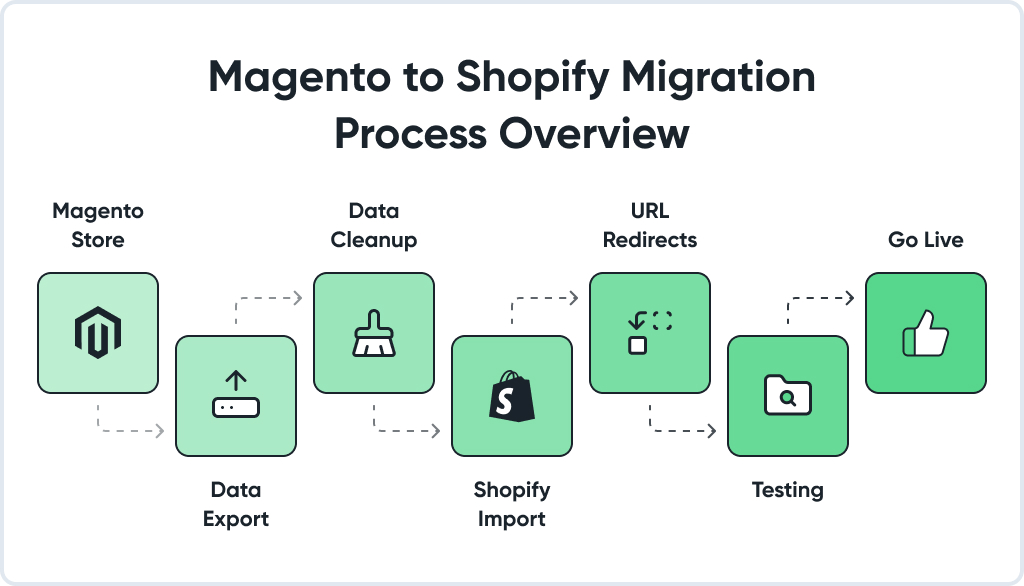
Export from Magento. System > Data Transfer > Export. Products, customers, orders, and content. Before you import anything, validate the export: check SKU uniqueness, attribute completeness, variant counts, and image URL accessibility. Bad source data creates bad migrated data.
Step 6
Import into Shopify. Use Shopify’s native CSV importer for products and customers. Orders, metafields, and redirects need a dedicated migration app. The field mapping between Magento and Shopify schemas is where errors hide. Give this step more time than you think it needs.
Step 7
Rebuild the storefront. Theme or custom build, test Core Web Vitals on your actual catalog before launch. The theme demo runs fast on sample data. Your real catalog with 10,000 products is a different story.
Step 8
Rebuild integrations. Replace Magento extensions with Shopify equivalents and rebuild ERP, PIM, CRM, payment, and shipping connectors. Do fulfillment, pricing, and inventory first. These touch revenue directly.
Step 9
Build the redirect map. Every Magento URL gets a corresponding Shopify URL. One to one. No chains (A redirects to B, redirecting to C). No dumping of discontinued pages at the homepage. The full workflow is in the SEO section below.
Step 10
QA, soft launch, go-live. Test every workflow end-to-end: browsing, checkout, payment, confirmation emails, returns. Soft-launch to a small traffic slice before full DNS cutover. Watch 404s and Search Console crawl errors every day for at least two weeks post-launch.

SEO-safe Magento to Shopify Migration: Protecting Your Rankings
Ten steps done. Don’t treat SEO as something you handle after the build. That’s where most projects go sideways.
Rankings don’t drop because of the platform switch. They drop because of what gets missed during the switch. We’ve seen stores with 80k+ organic sessions per month drop by 30 to 40% post-launch and spend four to six months recovering. Not because the data migration was flawed, but because redirect mapping was treated as a post-launch task. The SEO work has to be a build-phase deliverable.
The most common causes of ranking drops:
- Incomplete redirect mapping (the single biggest one);
- URL changes without a 1:1 redirect for each old URL;
- Old blog posts and legacy product pages dropped entirely;
- Canonical tags not configured on the new store;
- A Shopify theme that’s slower than the old Magento setup;
- Structured data gone: product schema, breadcrumbs, and FAQ markup all need to be rebuilt.
How we build the 301 redirect map:
- Export every Magento URL: products, collections, CMS pages, blog posts, indexable filter URLs, and old promo pages.
- Group them by type: product, category, content, blog, legacy. Each group has different redirect logic.
- Map every URL one-to-one, old to new. No chains. Discontinued products go to the nearest category or equivalent, not the homepage.
- Validate on staging with Screaming Frog or Sitebulb before anything goes live. Every redirect should resolve in one hop with a 301.
- After launch, monitor Search Console crawl errors daily for 2 to 4 weeks.
What has to be in place before you launch:
- URL patterns preserved for high-traffic pages wherever Shopify’s structure allows;
- New XML sitemap built and submitted to Google Search Console on launch day;
- Internal links updated to point directly to new URLs, no chains;
- Structured data rebuilt: product, breadcrumb, FAQ, review schema;
- Core Web Vitals validated: target LCP under 2.5s, INP under 200ms.
Heads up: A complete redirect map with imperfect URL structure beats a perfect URL structure with gaps in the redirect map. Every time. Don’t trade coverage for elegance.
Magento to Shopify Migration Cost & Timeline
What migration actually costs depends heavily on five things: catalog size, integration complexity, custom module count, B2B logic, and frontend scope. Here’s how projects typically break down:
| Store profile | Catalog size | Custom logic | Timeline | Estimated cost (USD) |
| Small B2C | <1k SKUs | Low | 6 to 8 weeks | $8,000 to $18,000 |
| Mid-size B2C | 1k to 20k SKUs | Medium | 8 to 12 weeks | $18,000 to $45,000 |
| Large B2C / multi-store | 20k+ SKUs | High | 12 to 18 weeks | $45,000 to $100,000+ |
| Shopify Plus B2B | Any | Very high | 14 to 22 weeks | $80,000 to $200,000+ |
| Enterprise / headless | Any | Custom | 4 to 6+ months | $150,000+ |
The biggest cost driver is almost always integrations. Two stores with identical catalog sizes can be entirely different projects. One has clean data and native integrations. The other has a custom ERP connector, a PIM sync, and a loyalty platform that needs rebuilding. Same SKU count, very different scope.
Custom module count, B2B pricing complexity, frontend scope, and order history depth all move the number. A store that needs a full lifetime order history migrated is a different budget line than one that’s fine with the last two years.
NOTE! A migration quote that seems too cheap usually means something got left out of scope. SEO work, integration rebuilds, and QA are the most common casualties. Budget for them upfront or pay for them in recovery later.
Pre-Launch Checklist for Magento to Shopify Migration
Don’t flip the DNS switch until you’ve gone through this.
Data integrity
- Products, SKUs, and variants were spot-checked against the Magento source. Not just imported, actually verified.
- Customer records match: addresses, groups, and email formats.
- Order history is in and queryable.
- CMS pages and blog posts are live with correct metadata.
SEO & redirects
- Every Magento URL has a 301 redirect. Not most of them. Everyone.
- No redirect chains, no URLs dumping to the homepage.
- Sitemap submitted to Search Console.
- Meta titles, descriptions, and alt text checked on your top 20 revenue pages.
- Product schema, breadcrumb schema, and any FAQ schema have been rebuilt.
- Canonical set.
Payments and checkout
- Run a real transaction through each payment gateway. Cards, PayPal, Apple Pay, Shop Pay.
- Tax rates validated for your main regions. Not just set up, actually tested with real transactions.
- Shipping zones and rates are working.
- Abandoned cart emails are firing correctly.
Store functionality & UX
- Search works on your actual catalog, not a sample.
- Variants behave correctly across product types.
- The store is usable on a phone. Check both iOS and Android.
- PageSpeed Insights on your top product pages: LCP under 2.5s, INP under 200ms.
Compliance & policies
- GDPR consent in place for EU visitors.
- Privacy policy, T&Cs, and refund policy updated. Not copy-pasted from Magento.
- All order and shipping confirmation emails are configured and tested.
Customer communication
- Password reset campaign written and queued.
- The support team has done at least one walkthrough of the Shopify admin.
- A customer-facing FAQ about the migration is prepared.

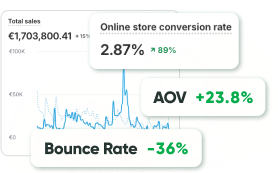
- +25% Less bounces
- +30% More avg duration
- +66% More page views
Common Magento to Shopify Migration Pitfalls
These aren’t edge cases. We see versions of these on most projects. The frustrating part is that most of them are entirely avoidable with upfront planning. A few of the costliest:
- Redirects left for launch week. SEO is a build-phase deliverable. If you’re still building the redirect map three days before go-live, something went wrong earlier in the project. In one fashion store, we inherited post-migration, incomplete redirects caused a 35% organic traffic drop that took nearly five months to recover. The redirect work would have taken two weeks if it had been scoped from day one.
- Rebuilding everything 1:1 from Magento. Before you rebuild any custom module, ask whether it’s actually driving value. Shopify often has a simpler native or app-based solution. Rebuilding for the sake of replicating adds cost and lock-in without adding capability.
- Underestimating the order history scope. Decide early: full lifetime, last 12 to 24 months, or reference-only. This affects tooling choices, timeline, and budget. Don’t leave it for week eight.
- Skipping operational testing. Admin workflows, fulfillment, and refunds. These get less attention than frontend QA, and they break revenue quietly. Test them like real production scenarios, not as an afterthought.
- Picking a theme without checking performance. Shopify themes vary significantly in how they perform on real catalogs. A theme that demos well can have poor LCP numbers on your actual product pages with 300 variants and multiple metafields. Check before committing.
- No password reset campaign. Customers hit your new store, try to log in, but can’t. Support ticket volume spikes. This is avoidable with a single planned email.
- No rollback plan. Keep Magento live for at least 48 hours after DNS cutover. Just in case.
For more details on migration mistakes and how to recover from them, check out our guide on costly migration mistakes.
Is Shopify the Right Call for Your Store? (and When It Isn’t)
You’re a strong candidate for Shopify if:
- Your team is spending too much time on Magento admin and waiting on developers for routine tasks
- You’re on Magento 1 and still haven’t moved. The compliance risk is real
- You’re looking at an Adobe Commerce renewal, and the number doesn’t feel justified
- Your catalog and integrations are reasonably standard
- You sell B2C or B2B with standard enough requirements that Shopify Plus B2B 2.0 covers you
Shopify probably isn’t right if:
- You’re running deep integrations across Adobe’s marketing ecosystem (Sensei, AEM, Target, Marketo), and the cost of moving those is prohibitive
- Your B2B workflows involve custom CPQ, multi-level approval chains, or EDI setups that Shopify Functions can’t handle
- You need server-side control for proprietary logic that a SaaS architecture simply doesn’t allow
- Products in your catalog regularly exceed 100 variants and can’t be restructured
- Your real problem is page speed or admin complexity on Magento, not the platform itself. That might be solvable without a full replatform
Why Work with a Certified Migration Partner
The difference between a smooth migration and one that costs six months of recovery usually comes down to one thing: whether SEO was treated as part of the build, not a post-launch fix.
Here’s what working with a certified partner actually looks like:
- Full-scope migration: data, integrations, redirects, custom logic, and storefront performance. Not just data transfer
- SEO built into every phase: redirect mapping starts in week two, not week ten
- Realistic timelines and honest costs: no scope gaps that surface mid-project
- Custom logic rebuilt correctly: Shopify Functions, Checkout Extensibility, B2B workflows
- Post-launch support: the project doesn’t close the day you go live
Bottom Line
The Magento to Shopify migration itself isn’t the hard part. The hard part is scoping it correctly, protecting your SEO throughout, and not skipping the operational testing that quietly determines whether post-launch is smooth or messy.
Mid-size stores generally live in 8 to 12 weeks. Enterprise and B2B projects with real custom logic take 4 to 6 months. Either way, the ongoing operational savings and faster launch cycles pay back the investment.
FAQ
Depends on what you’re moving. A clean mid-size B2C store with standard integrations: 8 to 12 weeks. Throw in a custom ERP connector, complex B2B logic, or a catalog of over 20k SKUs, and you’re looking at 14 to 22 weeks or more. We’ve had enterprise projects run close to 6 months. Not because anything went wrong, just because the scope was genuinely that large.
Not if the SEO work is built into the project from day one. Every old URL needs a destination. Structured data needs to be rebuilt on the new store. Search Console needs to be monitored for at least a month post-launch. Skip any of that, and you’re in recovery mode for longer than the migration itself took.
Yes, and honestly, M1 migrations are some of the cleaner ones. The data structure exports well, and since M1 is EOL, there’s zero reason to try to preserve the old architecture. Most of the actual work is rebuilding integrations.
They don’t come over. Encryption is one-way, full stop. Send a password reset campaign on launch day. Draft it before go-live so it’s ready to fire. If you don’t, expect a wave of support tickets within the first hour.
Yes, through third-party tooling. Shopify doesn’t have a native order import API. The real question is how much history you actually need. Full lifetime history is possible, but it adds scope. The last two years cover most merchant use cases. Reference-only is the lightest lift. Decide this in week one, not week eight.
Small stores: $8k to $18k. Mid-size B2C: $18k to $45k. Shopify Plus B2B with real custom logic: $80k to $200k+. The number moves most on integration complexity. A store with a clean catalog but four custom connectors can cost more than a larger store with native integrations. If a quote looks suspiciously low, something’s out of scope.
None of them transfers. Each one needs to be replaced or rebuilt. In our experience, roughly 70 to 80% of a typical extension stack has a usable Shopify equivalent. The remaining 20 to 30% needs custom Shopify development. Auditing this early is critical. It’s one of the biggest budget variables.
It is now. B2B 2.0 landed in 2024 and covered most of what was missing: company accounts, customer-specific pricing, net terms, and quote flows. Merchants who looked at Shopify Plus two or three years ago and ruled it out for B2B should take another look. The gap with Adobe Commerce is mostly in highly custom CPQ scenarios at this point.
With a properly staged cutover, we’re talking under 15 minutes. Just the DNS propagation window. The new store is fully built and tested before you touch DNS. That said, it’s worth having someone monitoring in real time the moment you flip the switch.
Can’t be ported directly. Needs to be rebuilt with Shopify Functions and Checkout Extensibility, which is Plus-only. For most checkout customizations (discount logic, payment rules, shipping conditions) this works well. If your checkout has proprietary logic baked into the Magento core, that’s a scoping conversation we need to have early.
No, but migration is the cheapest window you’ll ever have to do one. If the Magento theme is slow or hasn’t been touched in years, rebuilding it during migration is significantly cheaper than coming back to it separately. At a minimum, run Core Web Vitals on whatever theme you’re considering before you commit to it.
We use best-in-class tooling depending on the scope: orders, metafields, and redirect mapping. The tooling is one part of it; the QA and custom logic work around it is where the real effort goes.