

gomage.com gomage.com
Get in touch

Get in Touch

  • Phone
    +1 646-975-9434
  • SmartFront
  • Case studies
  • About Us
  • Blog
  • Contact Us
gomage.com
  • Services
    360 E-commerce Expertise
    • Magento
    • Shopify
    • Magento to Shopify Migration
    • UX/UI Design
    • Hyvä
    • Shopware
    Marketing & Growth
    • CRO
    • SEO
    AI Development
    • Custom AI Development
    • AI Chatbot Base
    • AI Chatbot Standart
    • AI Chatbot Enterprise
    • SmartBuy
    • EAA Package
    • AI Translation
    • SmartSell
    Outstaffing
    Tools
    • AI CRO Analyzer
    • AIA Dashboard


    GoMage is your team’s revenue-boosting force.

    Start a project with us and see the results firsthand.

  • SmartFront
  • Case studies
  • About Us
  • Blog
  • Contact Us
  • Services
    • 360 E-commerce Expertise
      • Magento
      • Shopify
      • Magento to Shopify Migration
      • UX/UI Design
      • Hyvä
      • Shopware
    • Marketing & Growth
      • CRO
      • SEO
    • AI Development
      • Custom AI Development
      • AI Chatbot Base
      • AI Chatbot Standart
      • AI Chatbot Enterprise
      • SmartBuy
      • EAA Package
      • AI Translation
      • SmartSell
    • Outstaffing
    • Tools
      • AI CRO Analyzer
      • AIA Dashboard
  • SmartFront
  • Case Studies
  • Blog
  • About Us
  • Contact Us
Get in touch
Blog
Merchant Stories

Magento Logo: How To Adjust Logo’s Via Admin Panel

Olha Anurina Photo
by Olha Anurina
Content Marketing Team Lead
Date
27 February, 2014
1 min
read
Magento Logo: How To Adjust Logo's Via Admin Panel

Of course, you have already noticed that themes for Magento ® have a logo picture or a text at the top of the page by default, which is also a reference to the home page of the Magento ®  store. It is possible to remove it or replace with your own picture or logo, using Magento ® admin panel.

Using Admin Panel to Adjust Magento Logo

You should log into the Magento ® admin panel and go to System > Configuration, click on Design from the menu on the left and choose Header from the options that appear (popup) in the middle of the display. You will see three fields that can be changed (Logo Image Src, Logo Image Alt, Welcome Text):
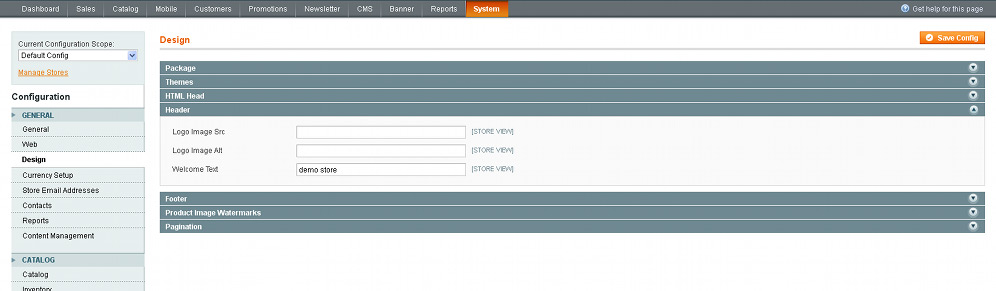
The first field called Logo Image Src displays the path to the picture for the particular theme. For example, it could be written as “image/logo.gif” and the full path for the default theme being:

Skin/frontend/base/default/images/logo.gif or for any other theme installed by you it could be slightly different:

Skin/frontend/default/”nameofyourtheme”/images

(of course, with “nameofyourtheme” replaced by the particular name of your theme, e.g. new, modern, magiczone, etc.)

The second field called Logo Image Alt shows you the text that is outputted when there is not an image or, if there is an image, the text is displayed when the mouse hovers over it.

If you want to delete the logo and text in Magento ®, you should simply delete both fields and leave them empty. It is a great opportunity to put your own logo/picture and the text instead of the default ones. The first step is to upload your own picture to the directory for the particular theme (as specified above) and in the field called Logo Image, enter image/nameofyourpicture.

But please, be attentive and don’t forget to add the file expansion for the picture such as .gif, .jpg, etc. You can upload the image from the files section of the Pixie control panel or with an FTP program such as FileZilla.

Table of Contents

  • Using Admin Panel to Adjust Magento Logo
blog_aside_slide1
Revamp Your Design and Boost Conversions!
Request Free UX/UI Audit
blog_aside_slide2
Find What’s Blocking Conversions
Free CRO Check
blog_aside_slide3
Unlock the true potential of your website
Get a Free SEO Audit
Tag:
  • Magento Logo
Share:
Previous article
Upgrade Magento ®: Rules and Concepts To Follow
February 27, 2014
Next article
Product Type Configuration in Magento ®: Increasing ROI
February 27, 2014
Back to Blog

    Get Your Free
 UX/UI Design, CRO or SEO Audit

      Get Your Free
UX/UI Audit!

      Thank you for submitting your information!

      Our team is already reviewing your details and preparing the audit to support your business growth. The audit process typically takes 4-5 business days. In the meantime, you’re welcome to schedule a free timeslot below for an audit introduction.

      Services

      • 360 Ecommerce Expertise
      • Marketing & Growth
      • AI Development
      • Outstaffing
      • SmartFront

      Expertise

      • Magento
      • Shopify
      • UX/UI Design
      • Hyvä
      • CRO
      • SEO

      Company

      • About Us
      • Case Studies
      • Blog
      • Contact Us

      Legal

      • Privacy Policy
      • Term Of Use
      • Phishing & Scam Notice
      • Advertising Terms and Conditions
      • Linkedln
      • Facebook
      • Twitter
      • Youtube
      footer-logo
      • Address
        1111B S Governors Ave STE 26679, Dover, DE 19904, USA
      • Phone
        +1 646-975-9434
      • Email Now
        sales@gomage.com

      Copyright 2025 GoMage

      gomage.com
      Cookies

      To enhance your experience, we use cookies to store and access device data. Consenting helps us process browsing behavior and unique IDs. Without consent, some features may be affected.

      Functional Always active
      These cookies are essential for providing the services you request or ensuring secure data transmission over a network.
      Preferences
      The technical storage or access is necessary for the legitimate purpose of storing preferences that are not requested by the subscriber or user.
      Statistics
      The technical storage or access that is used exclusively for statistical purposes. The technical storage or access that is used exclusively for anonymous statistical purposes. Without a subpoena, voluntary compliance on the part of your Internet Service Provider, or additional records from a third party, information stored or retrieved for this purpose alone cannot usually be used to identify you.
      Marketing
      These cookies help create user profiles, deliver personalized ads, and track your behavior across websites to offer relevant content.
      • Manage options
      • Manage services
      • Manage {vendor_count} vendors
      • Read more about these purposes
      View preferences
      • {title}
      • {title}
      • {title}
