If you’re running an EU or DACH-based store, a Magento to Shopware migration is rarely about chasing a trend.
More often, it’s the practical result of rising Adobe Commerce costs, slow Magento 2 upgrade cycles, and a simple observation: Shopware already dominates the German-speaking market.
You’re probably dealing with one of a few things. A Magento 1 instance that hit end-of-life back in 2020. Developer costs that climb with every Magento 2 upgrade. Or you’ve simply noticed Shopware offers open-source flexibility and a genuinely usable CMS, without the Adobe price tag.
We’ll walk through what changes, what migrates cleanly, and what it actually costs.
Key Insights for 2026
- Realistic timeline: 6 to 10 weeks for small stores; 10 to 16+ weeks for mid-market with B2B and ERP.
- Not everything migrates: passwords, complex B2B pricing logic, and most extensions need a plan early.
- Shopware is open-source and self-hosted. You keep infrastructure control, unlike SaaS alternatives.
- SEO protection starts in week one of the project, not launch week.

Is Shopware the Right Magento Alternative for Your Business?
Shopware isn’t automatically the right call just because you’re leaving Magento. Let’s help you qualify yourself first.
Strong signals you’re a Shopware candidate:
- You operate primarily in DACH or EU markets and want EU hosting and GDPR-native architecture
- You want to leave Magento but keep open-source flexibility, without SaaS lock-in
- Your marketing team is blocked. Every content change needs a developer on Magento’s Page Builder
- You’re still on Magento 1, and the compliance risk is real
- Your checkout logic is fairly standard. Shopware’s Rule Builder covers most cases
- You want a stronger CMS without bolting on a third-party tool
Signals that Shopware may not be the right call:
- You’re deeply embedded in the Adobe ecosystem, and those integrations are business-critical
- Your B2B workflows involve hyper-complex quote-to-cash or proprietary pricing engines
- Your primary market is North America, where Shopware’s partner network is thin
- A Hyvä theme migration or Magento optimization might solve the actual pain at a fraction of the cost
NOTE! This guide covers Magento to Shopware migration specifically. If you’re evaluating Shopify as an alternative, the considerations are meaningfully different – particularly around hosting model, SaaS vs. open-source control, and B2B architecture.
Why Merchants Are Leaving Magento in 2026, and Why Many Choose Shopware
Leaving Magento is one decision. Choosing Shopware over Shopify is a different choice.
Here’s the case for Shopware:
- Total cost of ownership. Adobe Commerce licensing plus developer-heavy maintenance add up fast. Shopware Community Edition is free, and paid plans still undercut Adobe Commerce.
- Open-source control without the complexity. You keep code access and self-hosted flexibility, but with a far cleaner architecture than Magento 2.
- Shopping Experiences CMS. Marketing teams build landing pages and promotions without a developer. Page Builder never delivered this.
- DACH ecosystem depth. Shopware dominates Germany, Austria, and Switzerland. Local agencies, plugins, and payment integrations like Klarna and SOFORT are deeply aligned.
- API-first architecture. Shopware 6 integrates cleanly with modern PIM and ERP stacks. Magento’s PWA Studio path has stalled in comparison.
- Magento 1 pressure. Stores still on M1 face real compliance risk in 2026. Shopware offers a modern replacement without going to SaaS.
NOTE! Shopware isn’t universal. Merchants with massive enterprise catalogs or North American audiences should evaluate carefully. Its strength is concentrated in the EU/DACH.

Magento vs Shopware 6: Platform Comparison for Decision-Makers
Here’s how the two platforms stack up:
| Criterion | Magento 2 / Adobe Commerce | Shopware 6 |
|---|---|---|
| License model | Open-source / Adobe Commerce: paid | Community Edition: free / paid plans |
| Hosting | Self-managed or Adobe Cloud | Self-hosted or Shopware PaaS |
| Maintenance | High, developer-driven | Lower, cleaner architecture |
| Admin UX | Complex, dev-driven | Intuitive, merchant-driven |
| CMS / content | Page Builder (limited) | Shopping Experiences (visual) |
| B2B features | Native, mature | B2B Suite, maturing fast |
| App ecosystem | ~3,600 extensions | ~4,000+ apps |
| Headless / composable | PWA Studio (stalled) | API-first, actively developed |
| DACH / EU fit | Declining | Dominant |
Shopware fits best for DACH and EU merchants, content-driven brands, and stores stuck on Magento 1.
Adobe Commerce still makes sense for very large US enterprises and businesses dependent on Adobe integrations.

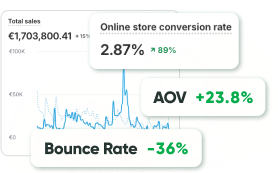
- 20-35% faster page load
- 100% compliance with Shopware Store
- 0 critical issues reported
What Migrates from Magento to Shopware, and What You’ll Need to Rebuild
Here’s what actually carries over and what gets rebuilt.
Data that migrates with the right tooling
- Products & variants: names, SKUs, prices, images, inventory, SEO meta
- Category structure: Magento categories map over; deep hierarchies need restructuring
- Customer records: names, emails, addresses (passwords can’t transfer due to encryption)
- Order history: via the Migration Assistant or custom scripts. Decide scope early
- Discount codes: basic rules migrate; complex logic needs a rebuild
- CMS pages: content migrates; layouts need rebuilding in Shopping Experiences
- Blog posts: content migrates; URLs change and need redirects
- SEO metadata: titles and descriptions migrate; URLs need 1:1 redirect mapping
What you’ll rebuild, and how
- Customer passwords. Launch a password reset campaign on go-live day
- Magento extensions. Roughly 60 to 70% have direct Shopware equivalents
- Custom checkout logic. Rebuild using the Rule Builder or Flow Builder
- URL structure. Completely different. A full redirect map is required
- Storefront. Magento themes don’t carry over. Rebuild on Twig Storefront or headless
- Complex B2B pricing. The B2B Suite handles most cases; verify edge cases first
Pro Tip: Don’t migrate your Magento complexity into Shopware 1:1. This is the cheapest moment to simplify. Shopware’s native features cover more than most merchants expect.
Shopware Migration Assistant vs. Agency-Led Migration: Choosing Your Approach
Now, the question of who runs the project:
| Approach | Best for | Pros | Cons |
|---|---|---|---|
| Migration Assistant (self-run) | Small stores, standard data | Official, free | No redirect or B2B logic handling |
| Migration tools + plugins | SMB with moderate complexity | Broader data scope | Still needs heavy QA |
| Agency-led (GoMage) | Mid-market, B2B, ERP-heavy stores | Full data integrity, SEO map | Higher upfront cost |
The Migration Assistant is a great start for simple stores. It’s official and free.
For mid-market brands, the gaps matter. It doesn’t build your redirect map or rebuild B2B logic. That’s where agency-led migration pays for itself.
Pro Tip: Even with the Migration Assistant, run a full staging migration first and validate redirect coverage before touching production DNS.
Magento to Shopware Migration: Step-by-Step Process
Here’s the process we run at GoMage.
Ten steps, in order:
Step 1: Build the business case. Document TCO targets and identify stakeholders: eCommerce manager, CTO, marketing, and IT. Define KPIs that matter to your business.
Step 2: Audit your Magento store. Inventory every extension honestly. Map each module to a Shopware replacement. Establish your SEO baseline in Search Console.
Step 3: Back up everything. Full database dump, media library, custom code, and API credentials.
Step 4: Choose your Shopware plan. Community Edition is free and self-hosted. Rise, Evolve, and Beyond add B2B Suite and SLA support. Shopware PaaS offers managed hosting.
Step 5: Export data from Magento. Use System > Data Transfer > Export. Clean the data first: fix encoding issues, remove orphan records.
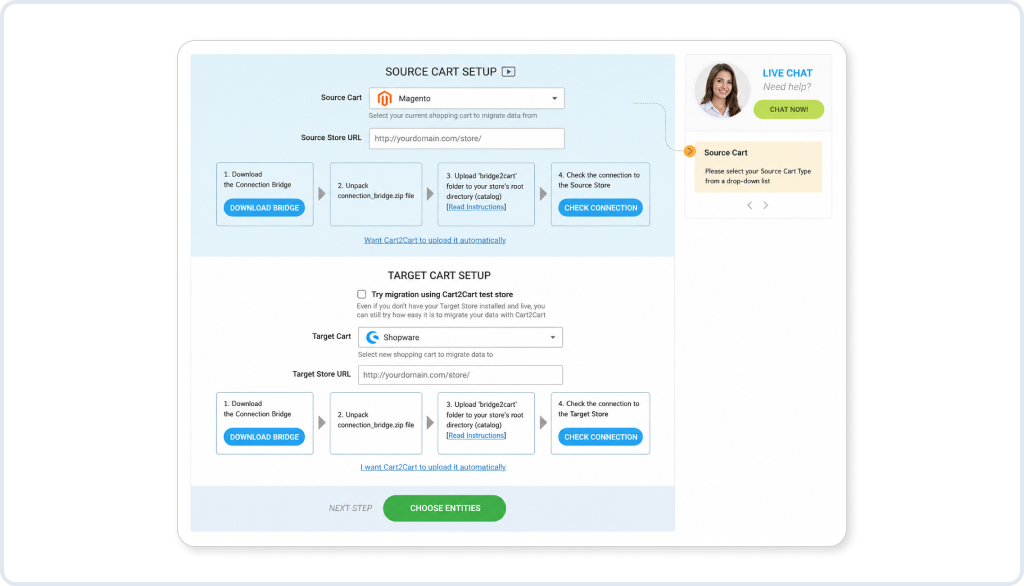
Step 6: Run the Migration Assistant. Connect your Magento source and map attributes to Shopware properties. Run in staging first.
Step 7: Rebuild the storefront. Choose Twig Storefront, a custom theme, or headless. Optimize for Core Web Vitals from the start.
Step 8: Configure Sales Channels. Set one up per storefront or market. Replace extensions and rebuild your integrations via Shopware’s API.
Step 9: Build the redirect map. Every Magento URL gets a Shopware URL, 1:1. No chains, no homepage dumps.
Step 10: QA, rehearsal, and go-live. Run a full rehearsal on the staging. Test checkout, payments, and fulfillment. Then switch to DNS with real-time monitoring.

SEO-Safe Magento to Shopware Migration: Protecting Your Rankings
Data migrated, storefront rebuilt. Now, the part that decides whether the project succeeds.
SEO fundamentals don’t change from platform to platform. But Shopware has its own quirks: Twig Storefront canonical behavior and Sales Channel-level sitemaps.
Why ranking drops happen:
- Incomplete redirect mapping is the single biggest cause
- URL changes without 1:1 mapping
- Dropped historical content
- Canonical tag misconfiguration
- Core Web Vitals regression from a heavy theme
301 redirect mapping workflow:
- Export every Magento URL: products, categories, blog, CMS pages
- Group them by type: product, category, blog, legacy
- Map 1:1, old to new. No chains, no homepage dumps
- Redirect discontinued products to the nearest equivalent, never the homepage
- Validate with a staging crawl before the DNS switch
- Monitor Search Console crawl errors daily for 2 to 4 weeks post-launch
Non-negotiables before launch:
- Configure canonical tags correctly across all Sales Channels
- Generate and submit new XML sitemaps on the go-live day
- Audit internal links post-migration and eliminate redirect chains
- Re-implement structured data: product, breadcrumb, FAQ schema
- Test Core Web Vitals on staging before launch
- Validate robots.txt. Don’t carry staging noindex into production
Insight:Redirect completeness matters more than URL perfection. A complete map protects organic revenue while Google re-crawls your store. Gaps here are hard to recover from cleanly. See Google’s guidance on site moves for the full framework.
Magento to Shopware Migration Cost & Timeline
Here’s what projects typically cost:
| Store profile | Catalog size | Timeline | Estimated cost (USD) |
|---|---|---|---|
| Small B2C | <500 SKUs | 6 to 8 weeks | $6,000 to $15,000 |
| Mid-size B2C | 500 to 10k SKUs | 8 to 12 weeks | $15,000 to $40,000 |
| Large B2C | 10k+ SKUs | 12 to 18 weeks | $40,000 to $90,000+ |
| B2B with ERP | Any | 14 to 20 weeks | $60,000 to $150,000+ |
| Enterprise | Any | 4 to 6+ months | $120,000+ |
What actually drives the number:
- ERP and PIM integrations are the biggest cost driver, by far
- Custom module rebuilds add up. Each needs a Shopware equivalent built or configured
- B2B logic matters here. Pricing and approval workflows often need custom work
- Storefront scope swings the budget hard, from theme adaptation to a full headless build
- Data quality is the quiet driver nobody budgets for
NOTE! Cheap migrations almost always cost more later. SEO losses and rework cycles routinely exceed the savings from cutting corners.
Pre-Launch Checklist: Magento to Shopware Migration
Don’t touch production DNS until you’ve gone through this.
Data integrity
- Products, SKUs, and variants verified against the Magento source
- Customer profiles and groups match Magento records
- Order history imported and searchable
SEO & redirects
- 301 redirects live for every Magento URL
- New sitemap submitted per Sales Channel
- Structured data implemented: product, breadcrumb, FAQ
- robots.txt validated; no staging noindex in production
Checkout & payments
- Payment gateways tested with real transactions
- VAT calculations validated per country
- Shipping zones and rates configured and tested
Functionality & UX
- Search and filtering were tested on the live catalog
- Mobile responsiveness verified on iOS and Android
- Page speed tested: LCP under 2.5s, INP under 200ms
Compliance & policies
- GDPR cookie consent is active for EU traffic
- Privacy policy and T&Cs updated for Shopware
Customer communication
- Password reset campaign ready for launch day
- Support team trained on the Shopware admin
Shopware vs Shopify for Magento Migrants: Which Platform Is Right for You?
If you haven’t committed to a destination platform, this should help.
The choice comes down to four things: hosting preference, market, B2B complexity, and how much open-source control matters to you.
| Factor | Choose Shopware | Choose Shopify |
|---|---|---|
| Primary market | EU / DACH | Global, US and UK |
| Hosting | Self-hosted control | Fully hosted SaaS |
| CMS needs | Rich, visual | App-dependent |
| Payment ecosystem | Klarna, SOFORT, Ratepay | Global + Shop Pay |
| Budget for mid-market | Lower, CE is free | Higher, costs compound |
Both are strong Magento alternatives, just for different profiles. If you’re in the EU/DACH and want open-source control, Shopware wins. If you’re SaaS-first and global, Shopify Plus is the stronger call.
We work with both, so we’ll tell you honestly which one fits.
What to Expect When You Work with GoMage on Your Migration
Here’s what the engagement actually looks like:
- Migration starts with a discovery audit, before we write a line of code
- SEO redirect mapping is a week-one deliverable, not a launch-week scramble
- We run a full rehearsal in staging first. What you see there is what launches
- Data is validated against the source at every stage
- Post-launch monitoring is included for the first 2 to 4 weeks
- Transparent timeline and cost, with no scope-creep surprises
Most of our Shopware clients expect a rebuild from scratch. What surprises them is how much of their Magento setup was solving problems Shopware already handles natively.” — GoMage Shopware Migration Team
Bottom Line
A Magento to Shopware migration is a replatforming decision, not a data transfer job.
For EU and DACH merchants who want open-source control and a lower TCO than Adobe Commerce, Shopware is a strong alternative, though not a universal one.
What migrates cleanly matters more than the headline timeline. SEO protection has to start in week one. And the realistic timeline depends on your catalog and integration scope, not on how fast a vendor promises to move.
See also: Why Migrate from Magento to Shopify: 10 Reasons Why Businesses Make the MoveFAQ
Small stores typically take 6 to 10 weeks. Mid-market stores with B2B and ERP run 10 to 16+ weeks. Enterprise projects can extend from 4 to 6 months.
Not if redirect mapping starts in week one. A complete 301 map and Search Console monitoring for 2 to 4 weeks will protect your rankings through the switch.
Yes. M1’s data exports cleanly, and since it’s end-of-life, there’s no reason to preserve its architecture.
It handles core data well, but not your redirect map or B2B logic. Those need manual work or an agency.
No. Encryption makes that impossible. Plan a password reset campaign for launch day.
Small stores run $6,000 to $15,000. Mid-size B2C falls between $15,000 and $40,000. B2B with ERP ranges from $60,000 to $150,000+.
Roughly 60 to 70% have a direct equivalent. The rest need custom development.
For most standard cases, yes. The B2B Suite is maturing fast, though extremely complex workflows may still exceed it.
Shopware fits EU/DACH merchants who want open-source control. Shopify fits those who want a fully hosted SaaS and the largest app ecosystem.
Yes. Magento themes don’t carry over, but this is also the cheapest point to fix performance issues.
It’s Shopware’s visual content editor. Unlike Page Builder, marketing teams can manage it directl
Yes. Self-hosted EU infrastructure or Shopware PaaS with EU data residency makes compliance straightforward.