Picture yourself at the most significant sales event of the annual calendar. You ensured your marketing is foolproof, social media ads are driving more traffic, and inventory is stocked.
Even then, a small update to a shipping plugin caused an unexpected silent failure. Whenever customers click the Buy button, the loading spinner on the checkout page spins infinitely. You’re too late to notice the falling sales. As you know, in online shopping, any glitch or bug is certainly not an issue, but a blocker for your revenue.
Every business should invest in automated e-commerce software testing to detect technical issues before customers even notice them. Neither standard hosting systems nor manual checks can detect hidden issues caused by code changes, new plugins, or browser updates.
In fact, research suggests that an online store loses an average of $4.8 million annually due to unresolved software bugs and website downtime. Even if e-commerce sites go down for just one hour, it could be worth $5,600 or more in lost sales and opportunities.
What is the Leaky Bucket Problem in E-Commerce?
Running an e-commerce site without implementing automation is like filling a bucket that has holes. When you fill that bucket with water, you will lose water. Similarly, when you invest money in a business that has loopholes, you will lose revenue. This is the reason why you should avoid technical glitches in your e-commerce site.
All e-commerce website owners start with manual testing. After making every change, their manual tester is instructed to manually test their product to ensure every functionality is working fine. While this may seem like a precautionary measure, it is likely to fail as your site grows. This challenge increases as you add more products and integrate services such as payment gateways, shipping systems, and tax calculators with your website.
As your e-commerce site grows, the number of devices, browsers, and user behaviors that need to be tested increases exponentially. Manual testing alone cannot effectively handle such complex scenarios.
Reasons Behind Manual Testing Failure
- Human Error: Manual testers may miss testing a UI or a functionality on a specific version of a particular browser on a particular device.
- Time Consumption: Manual testers can take several hours to test a checkout flow. If they want to check all the products on the site, it will take a long time.
- The Weekend Bug: When your developers push something at the very end of your week, the QA team will be stuck in the office. It is not possible to quickly find if something was broken somewhere without automation. Until the next business day, you probably won’t easily notice the hidden bugs present in the new builds.
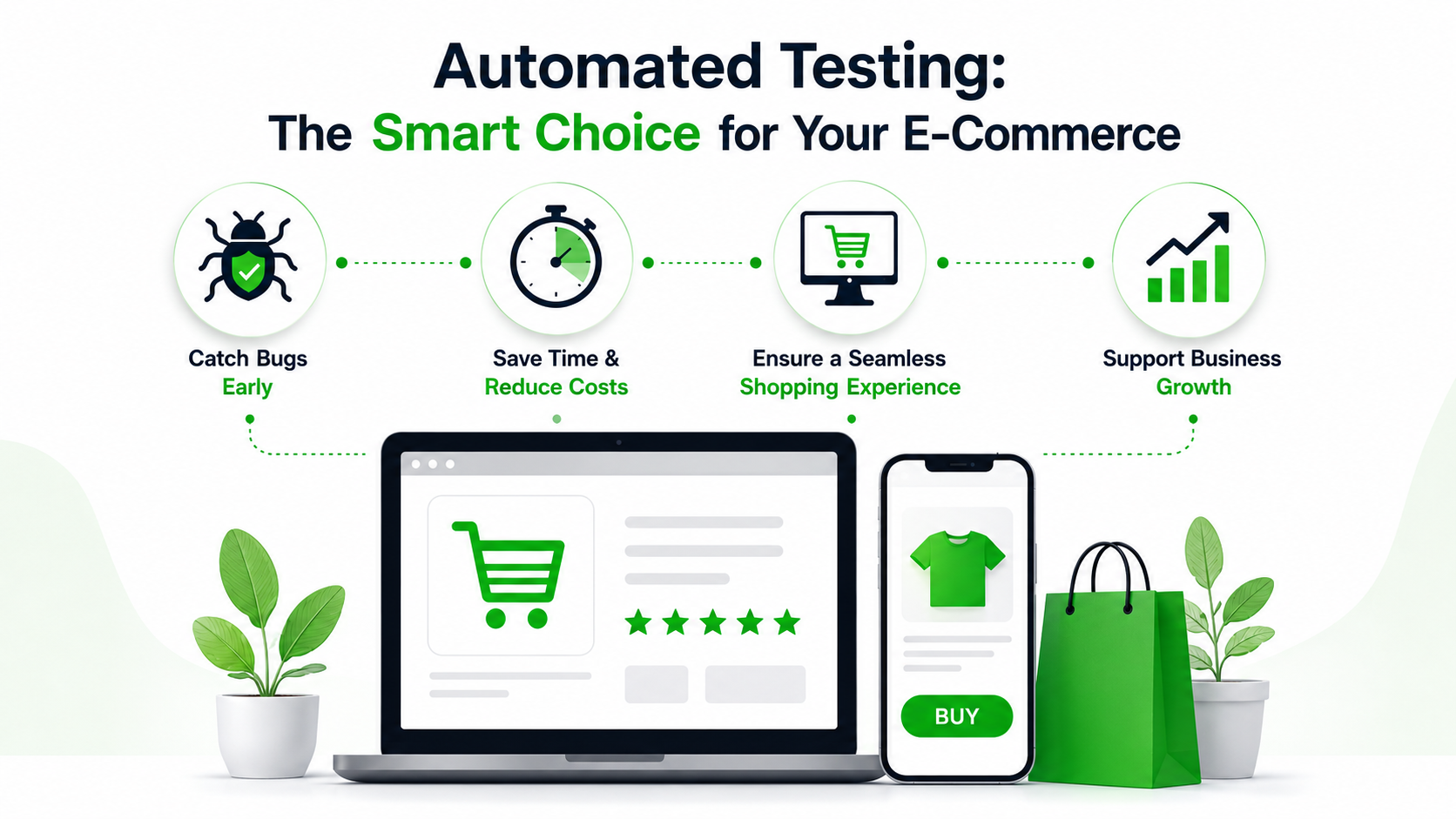
Why Automated Testing Matters Even More Today
Automated Tests Increase Test Coverage
Automation helps you run tests simultaneously across thousands of different scenarios and user types, including mobile and desktop. This helps ensure the functionality of your website is better than manual testing.
Automated Testing Improves Accuracy
Automated tests perform with the same accuracy every time. They never get tired or lose focus. This helps avoid false negatives and false positives that typically occur in manual testing.
Automated Testing Saves Time and Costs
While automation can be a bit more expensive to set up initially, it saves money in the long run by eliminating the need for manual testers to re-test the same things before each update. Organizations that invest in automation can bring their new features to market faster (release cycle times) and reduce future costs for quality assurance (QA).
Automated Testing Helps Spot Hard‑to‑Find Problems
Poor testing can leave website bugs unresolved. Statistics show that such bugs on e-commerce sites lead to customer churn and reduce repeated purchases. These issues could have been prevented in advance through accurate automated tests.
What Should You Test?
While testing every pixel on your site may be complex, you should test your Money Paths. The Money Path is the path through which your customers pay you for the business. Your business will stop if these steps fail.
| Feature | Why it Matters |
| The Search Bar | If a customer can’t find a product, they can’t buy it. |
| The Shopping Cart | Quantities must update correctly, and “out of stock” warnings must appear. |
| Payment Gateways | The connection between your site and the bank must be secure and functional. |
| Mobile Responsiveness | Over 55% of shoppers buy via their mobile phones. Buttons must be clickable on small screens. |
The No-Code Revolution: How Automation Tools Change the Game
For many years, only large companies with huge budgets and coding expertise could afford software testing. If you couldn’t code with complex languages like Java or Python, you were stuck with manual testing.
Later, automation tools came in, and they cut down many of the hassles of manual testing. Still, scripting was often a challenge for QA teams. Moreover, when something in the DOM changes, test maintenance becomes difficult. Conflicts with XPath and DOM selectors made test cases fail frequently.
But today, with the availability of no-code automation tools, even people with little technical knowledge can easily set up and manage tests without writing a single line of code. These tools help non-programmers, such as business owners and site managers, to create and maintain tests to ensure critical functionality is working. This opens up the opportunity for more businesses to utilize automation, not just for tech experts.
Today’s advanced automation tools include features powered by AI technology. This helps tests self-heal even when there are small changes in the website’s layout. This reduces maintenance costs and allows tests to run for a long time without interruption.
Use Case: Testing a Flash Sale
Let’s analyze a common scenario. You are introducing a 20% discount for a limited time on your e-commerce website. You must be 100% certain that when a user enters “FLASH20,” the price drops and taxes are calculated correctly.
Without automation, you may not notice edge case errors, such as:
- Discount coupons are not working on certain devices.
- Cart total not updating correctly.
- Errors in calculating tax or shipping charges.
Traditionally, developers had to write several lines of code to perform these types of tests. Even small changes made to the website later would break these tests, requiring more time to fix them. But no-code AI-based automation tools simplify this process and reduce the hassle of maintenance.
Here’s an example of a plain English style automated test script that you can run regularly:
- open url “https://your-website.com“
- click “New Arrivals”
- click on the first product
- click “Add to Cart”
- click “Checkout”
- enter “FLASH20” into “Discount Code”
- click “Apply”
- check that “Total” contains “$80.00” (assuming a $100 product)
This test can be configured to run regularly. If a plugin update or server lag causes a failure, the no-code automation tool that you use notifies you immediately. You can fix the problem before customers notice.
Reference Test Case
Automated checkout flow example
- click “Laptops”
- click “Sony vaio i5”
- click “Add to cart”
- accept alert
- click “Cart”
- click “Place Order”
- enter “John Doe” into “Name”
- enter “USA” into “Country”
- enter “New York” into “City”
- enter “1234567890123456” into “Credit card”
- enter “12” into “Month”
- enter “2025” into “Year”
- click “Purchase”
- check that page contains “Thank you for your purchase!”
- click “OK”
This is a general template. You can modify it to suit your e-commerce website based on the automation tool that you have.
Choosing the Right Tests to Automate
Not everything needs automated testing. Start with those that are most important to your business:
- Search and filtering
- Add to cart and quantity updates
- Checking if promo codes are working
- Payment and gateway functionality
- Session timeouts and error recovery
After these, you can gradually expand your testing to cross-browser tests and mobile app testing if necessary.
How to Get Started with E-Commerce Automation
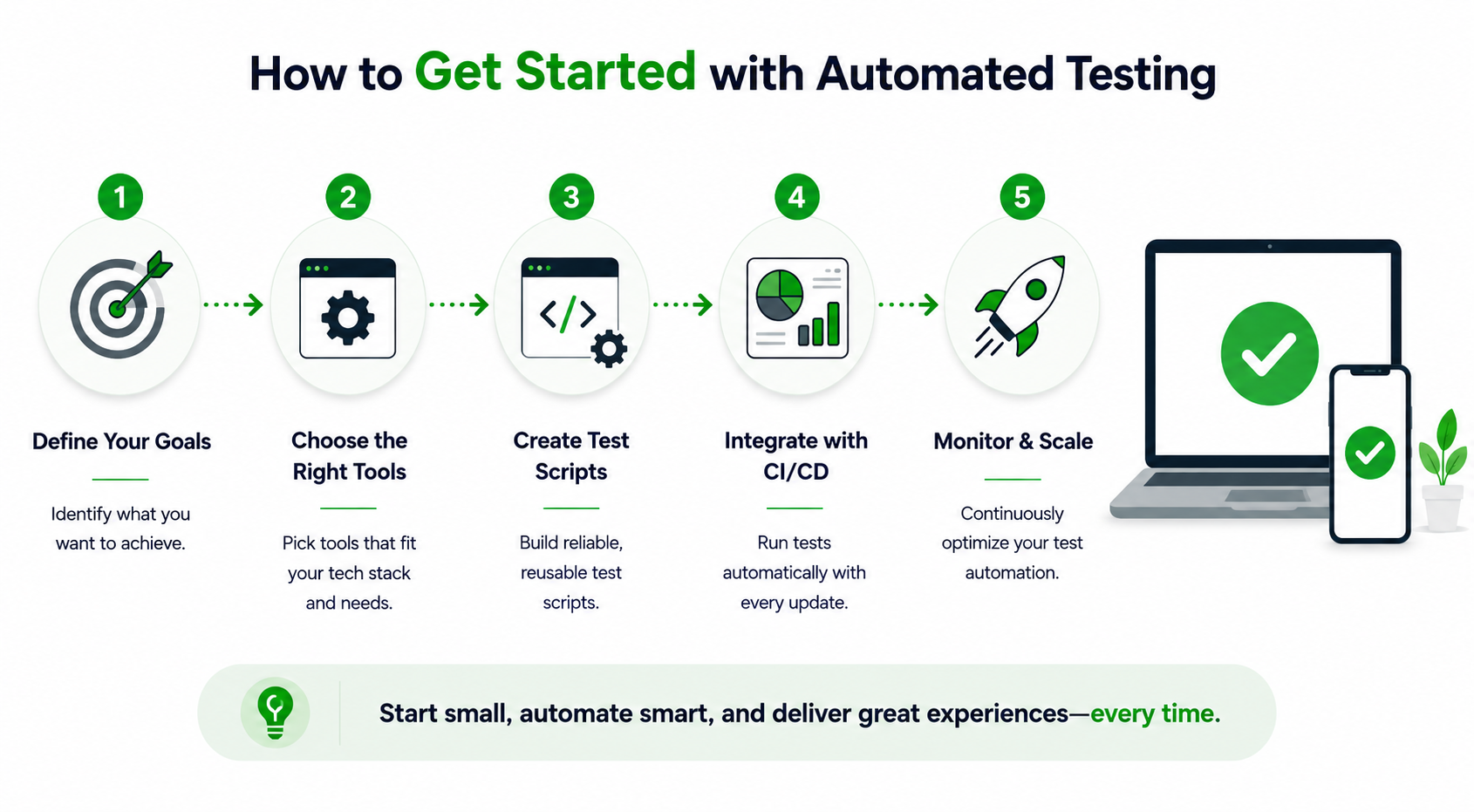
Don’t be in a hurry to start e-commerce automation. Take your time and think about every aspect to implement automation. Automation is not about automating everything on your website. Instead, try to focus only on critical functionalities on your website. Once critical features are automated, focus on the major and minor aspects gradually.
- Find A Reliable Hosting Provider: A stable site makes automation testing easier. Hence, find a hosting provider that can handle a high volume of traffic to your website.
- Identify Main Functionalities: Instead of testing everything in an e-commerce website, test the purchase flow starting from home, product list, product, checkout, and order confirmation page. Make this your priority, and ensure your testing strategy aligns with any ERP or Business Central implementation services you are using so that orders, inventory, and finances stay perfectly in sync.
- Choose an AI-Based Automation Tool: To avoid scripting challenges, choose an AI-based automation tool. These tools can help you avoid test maintenance issues. Also, you don’t have to be a technical person to use these tools.
- Cross-Browser Testing: Test your site on various browsers like Chrome, Firefox, Safari, Android, and iOS to identify any potential bugs.
Concluding Ideas
Every customer looks for a smooth, fast, and bug-free shopping experience. No customer has the patience to wait until the bugs on your site are resolved. When a site breaks at any point, customers will simply leave and find a competitor’s website. When a customer leaves, your brand will be considered unreliable.
When you implement automation testing, you will never have to worry about such issues. Automation will protect your brand’s credibility, avoid website downtime, and make sure that every functionality works correctly on your site. Ultimately, you can focus on growing your business without focusing on the technical side.
During peak traffic times, can you even imagine downtime on your e-commerce website? That’s exactly where automation helps you. Haven’t you automated your e-commerce site yet? Think about it and safeguard your site.