Technical SEO shows that organic traffic declines are rarely caused by obvious surface issues.
A site drops from position four to position eleven over three months. The instinct is to look at content quality, backlinks, and maybe a competitor who published something better. Those might be factors. But in our experience, the more likely cause is something structural: a crawl issue that developed after a platform update, a Core Web Vitals score that crossed into “poor” territory on mobile without anyone noticing, redirect chains that accumulated after a URL restructure nobody fully finished. The content didn’t change. The technical foundation shifted under it.
What follows covers that foundation. The actual things to check, why they matter, and how they interact with each other.
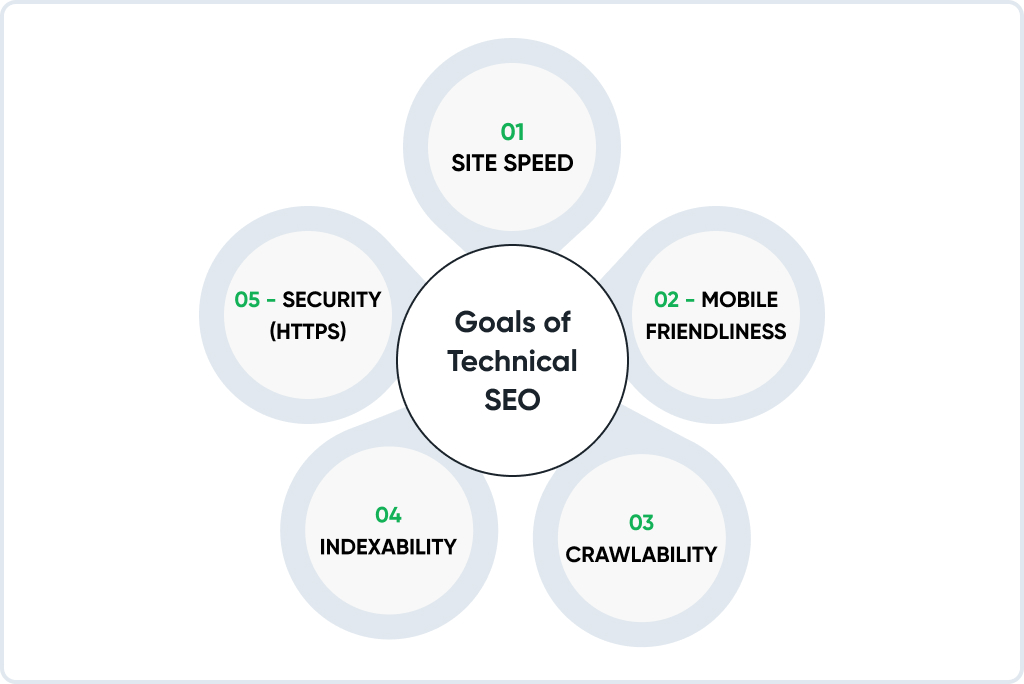
Crawling Comes First
Before a page ranks, it needs to be indexed. Before it gets indexed, Googlebot has to find it and successfully fetch it. That chain is where most technical audits reveal their first problems.
Googlebot discovers pages by following links. It starts from a seed set of known URLs, fetches and parses those pages, extracts links, and queues new URLs for crawling. The frequency and depth of that process at any given site depends on what’s called crawl budget: an informal allocation based on how authoritative the domain is and how efficiently the server handles crawler requests.
For a ten-page brochure site, crawl budget is irrelevant. For an e-commerce platform with 60,000 product pages, sorting filters that generate parameter combinations, and category archives going back years, crawl budget determines which pages are actually discoverable. If Googlebot is burning its daily allocation, crawling hundreds of near-identical filtered pages that don’t need to be indexed, important product pages get visited less frequently. New arrivals take longer to surface. Seasonal pages miss their window.
Robots.txt
The robots.txt file lives at yourdomain.com/robots.txt and tells crawlers which paths they’re allowed to access. It’s simple enough that misconfiguration is common, and some misconfiguration is catastrophic.
The worst version: Disallow: / pushed to production from a staging environment. This blocks every crawler from every page on the site. Rankings begin disappearing within days. The fix takes five minutes once someone identifies the problem. Identifying the problem can take weeks if nobody is monitoring Search Console actively.
Worth checking separately: whether CSS and JavaScript files are accessible to crawlers. Google renders pages visually before evaluating them, the same way a browser does. Block those files, and Google is reading stripped HTML without the visual structure that helps it interpret what the page is actually about. Rankings for affected pages often degrade in ways that don’t connect obviously back to the real cause.
Sitemaps
A sitemap is a direct submission to Google of URLs you want indexed. The practical constraint: every URL in it should return a 200, carry no noindex directive, and represent the canonical version of the page. Not a redirect destination, not a filtered parameter URL, not a page that canonicals to something else.
Including contradictory URLs (submit for indexing, but also noindex) creates an inconsistency that Google responds to by trusting the sitemap less. Keep it clean. The Coverage report in Search Console shows which submitted URLs are indexed and, for those that aren’t, usually indicates why. That report should be checked monthly at a minimum.
Redirect chains
URL A redirects to B. B redirects to C. C is the actual destination. Each hop costs a small amount of crawl time and passes slightly less PageRank than a direct redirect would. More practically, chains accumulate without anybody designing them that way. A destination that was already a redirect when someone pointed another redirect at it.
The fix is mechanical: crawl the site, identify chains, and update them to jump directly to the final destination. Do this after any migration. Verify it again six months later.
Core Web Vitals: Three Different Problems, Three Different Solutions
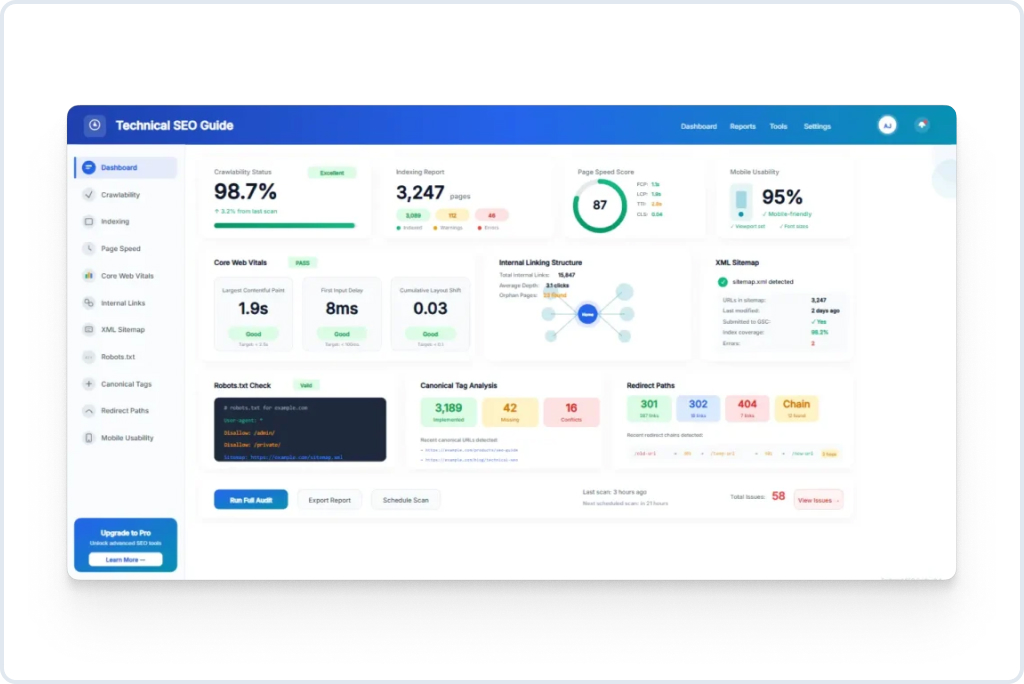
The naming makes them sound like variations on the same theme. They aren’t. A site failing LCP and a site failing CLS have completely different technical problems, and the same is true for INP. The fixes don’t overlap.
Largest Contentful Paint
LCP marks the point where the largest visible element on the page finishes rendering. Usually, this is the hero image or main heading. Google’s threshold for “good” is 2.5 seconds. Above 4 seconds is poor.
What causes slow LCP in practice:
Images are served at a higher resolution than their display size requires, forcing unnecessary data transfer. A 2400-pixel-wide image displayed in a 600-pixel column sends four times the data the browser needs and takes proportionally longer to load.
Slow server response time. If TTFB is 1.8 seconds, the browser hasn’t received anything before 1.8 seconds have passed. No amount of image optimization improves LCP past that ceiling.
Render-blocking scripts in the document head: synchronous JavaScript that the browser must execute before it can continue building the page.
And the one that surprises people: lazy loading applied to the LCP element itself. Lazy loading is a legitimate performance technique for below-fold images. Applied globally to all images without exception, it often catches the hero image and tells the browser to deprioritize loading the element that Google is actively measuring. This shows up constantly in audits on sites that installed a performance plugin and left it on default settings.
The most reliable LCP fixes: serve images in WebP at correct display dimensions, preload the LCP image with a <link rel=”preload”> tag, and confirm it doesn’t carry a loading=”lazy” attribute.
Cumulative Layout Shift
CLS measures how much visible content shifts position during page load. Good is 0.1 or below. The user experience of bad CLS: text moving while you’re reading it, a button shifting as you’re tapping it, and content reorganizing because an ad loaded above it.
Primary cause: elements without explicit dimensions. When the browser doesn’t know how large an image or embed will be before it loads, it can’t reserve space. Content renders into the available area. The element loads and pushes everything else. Everything shifts.
The fix is explicit width and height attributes on image elements. The browser can then reserve the correct space before the image arrives. Ads and embeds injected above existing content after load are the other significant contributors. These require either reserving space in advance or loading them in a way that doesn’t displace existing content.
Interaction with Next Paint
INP measures the delay from user interaction (click, tap, keystroke) to the next visible update from the browser. Under 200ms is good. Above 500ms means users perceive the page as unresponsive.
The cause is almost always JavaScript. Long tasks blocking the main thread prevent the browser from processing input events while those tasks run. Marketing tag stacks are frequently the culprit: analytics, heatmapping, chat, retargeting, and A/B testing software. Each addition felt small at the time. Together, they can add 600ms of main-thread blocking that accounts for the entire INP failure. Nobody connected the performance decline to the script additions because they happened one at a time over 18 months, and nobody was measuring INP during that period.
Fixing INP means auditing what’s running on the main thread, deferring scripts that don’t need to execute during initial load, and removing scripts that aren’t actively being used.
Field data versus lab data: why the distinction matters
Search Console’s Core Web Vitals report shows field data: measurements from real Chrome users visiting real pages. PageSpeed Insights and Lighthouse show lab data from a controlled environment. Lab data is useful for development and debugging. Field data is what Google uses for ranking. These numbers can differ substantially. A page scoring 85 in Lighthouse and failing Core Web Vitals in field data is a common pattern. Always check Search Console field data, filtered to mobile, which carries more weight due to mobile-first indexing.
Site Architecture
Internal linking structure affects how PageRank flows through a site, how frequently different pages get crawled, and how Google interprets the topical relationships between pages. Architecture decisions from a site’s early years often constrain everything built on top of them.
Depth
Pages many clicks from the homepage receive less internal PageRank and get crawled less frequently. Three clicks from the homepage is a reasonable target for any page that needs to rank. Pages buried at six or seven clicks in deep category hierarchies often underperform relative to their content quality. Not because the content is weak, but because they’re functionally isolated within the site’s link structure.
Orphan pages
An orphan page is indexed but receives no internal links from anywhere else on the site. Googlebot can find it via sitemap, but it receives no PageRank from the internal link graph and gets crawled less often. On most sites that have been running for several years, orphan pages accumulate steadily: old campaign landing pages, posts that dropped off listing pages as pagination pushed them back, migrated content where some internal links pointed to the new URL, and some still pointed at the old one.
Crawl the site, compare results against the sitemap, and identify which indexed pages have zero internal links pointing at them. For pages worth keeping, add contextually relevant links from existing content. For pages with no purpose, redirect or deindex.
Canonical tags
The canonical tag specifies which version of a URL is authoritative when multiple URLs serve similar or identical content. E-commerce sites need this for products accessible through multiple category paths. Sites with faceted navigation need it for filter-generated URLs. Sites accessible via both www and non-www (before server-level redirect) need consistent canonicalization.
A canonical chain, where page A canonicals to B, which canonicals to C, should be flattened to point A directly at C. Chains signal either sloppy implementation or an incomplete migration, and Google may not follow them reliably.
Internal links
When new content is published, it should receive internal links from existing relevant pages on the same day. Not just a sitemap entry. Actual links from indexed pages that carry internal PageRank. A page published and left unlinked relies entirely on sitemap discovery and receives no internal PageRank until something links to it.
Anchor text carries semantic information. “This breakdown of crawl budget management” tells crawlers what the destination covers. “Click here” tells them nothing. Use descriptive anchors. Vary the phrasing across different links to the same destination rather than repeating the same phrase every time.
On-Page SEO Factors
Title tags
Title tags are the on-page element with the most direct and consistent ranking influence. They appear in search results as the clickable headline, in browser tabs, and are processed early when Google evaluates a page’s relevance.
Effective title tags are specific to the page’s content, lead with the primary keyword or most descriptive term, and stay within 55 to 60 characters. They’re written as natural language because they’re also what a user reads when deciding whether to click.
What audits consistently surface: duplicate titles across large sections of a site (common on e-commerce with templated metadata that doesn’t differentiate between subcategories), titles from the original site launch that haven’t been updated despite the page content evolving significantly, and titles that lead with the brand name rather than the topic on pages where the brand is not the search intent.
Every page needs a unique title. Duplicate titles across two pages either mean the pages are too similar to justify both existing, or the metadata is wrong on one of them. Neither is a good situation.
Meta descriptions
Not a ranking factor. They affect click-through rate, which affects rankings indirectly. Pages that consistently underperform their expected CTR at a given ranking position tend to drift downward, and pages that overperform tend to hold or rise.
Write them as a specific description of what the page delivers, not a generic description of what the site is about. Include the primary keyword because Google bolds matching terms in snippets, which draws the eye. Under 160 characters.
Google rewrites meta descriptions for a significant share of queries, pulling text from page content that more directly addresses the search intent. Descriptions written to closely reflect the actual content of the page, addressed to the specific query they’re targeting, get rewritten less often.
Heading structure
One H1 per page. It should contain the primary keyword and accurately describe the page. The H1 is the first thing users read on arrival. The title tag is what they saw before clicking. They can vary; they don’t need to match verbatim.
Subheadings (H2, H3) structure content for readers and communicate topical scope to crawlers. A page with clear H2 sections organized around the major subtopics of its subject signals more comprehensive coverage than equivalent content with no structural differentiation. H2 for major sections, H3 for subsections within those, secondary keyword variations where they fit without distorting meaning.
Alt text
Describes image content to screen readers. Gives search engines text-based context for images they can’t reliably interpret through visual analysis alone.
Write accurate descriptions. If the primary keyword fits naturally within an accurate description, include it. If fitting it in requires misrepresenting what the image shows, don’t. Alt text that reads as a keyword sequence rather than a description is treated as spam.
Empty alt attributes (alt=””) on purely decorative images tell screen readers to skip them. Content images need descriptive text.
Structured data
Schema markup in JSON-LD communicates explicit information about page content in a machine-readable format. It doesn’t directly improve rankings but enables rich results: review stars, FAQ dropdowns, breadcrumb trails, product availability, and event dates.
Rich results increase listing size and typically improve click-through rates. For e-commerce, local businesses, and sites with how-to or FAQ content, implementing correct schema on high-value pages produces measurable CTR improvement. Validate with Google’s Rich Results Test before deploying. Monitor the Enhancements report in Search Console for errors that Google catches post-deployment that the test tool missed.
Technical SEO Checklist
Run quarterly. Run immediately after migrations, major URL restructures, CMS upgrades, or large new content sections added to the site.
Crawl and indexation
- robots.txt verified: no pages, CSS, or JavaScript blocked unintentionally
- Sitemap contains only live, indexable, canonical URLs returning 200 status
- Sitemap submitted to Search Console
- Coverage report reviewed; unexpected exclusions investigated
- Key pages confirmed indexed via URL Inspection
- Crawl completed; orphan pages identified and addressed
- No accidental noindex on pages intended to be indexed
Core Web Vitals and speed
- LCP under 2.5 seconds in Search Console field data, mobile
- CLS at 0.1 or below
- INP under 200ms
- LCP element identified; preloaded in document head; not lazy-loaded
- All images carry explicit width and height attributes
- Images in WebP or AVIF format
- TTFB under 600ms
- Render-blocking scripts deferred
- Third-party script audit done; unused scripts removed
- CDN serving static assets
- Page caching active
URLs, redirects, canonicals
- Redirect chains resolved to single-hop 301s
- No redirect loops
- HTTP redirects to the HTTPS site
- SSL is valid and not expiring within 60 days
- Self-referencing canonicals on all pages
- Parameter-generated duplicate URLs handled
On-page
- Unique title under 60 characters on every page
- Unique meta description under 160 characters on every page
- Exactly one H1 per page containing the primary keyword
- Heading hierarchy consistent
- Content images have descriptive alt text
- Internal links use descriptive, varied anchor text
- Schema implemented and validated; no Enhancements errors in Search Console
Architecture
- No broken internal links
- High-priority pages within three clicks of the homepage
- New content linked from existing relevant pages on the publish date
Mobile
- Pages pass Mobile-Friendly Test
- No horizontal overflow at narrow viewport widths
- Core Web Vitals pass on mobile field data specifically
Mistakes That Cost Rankings Without Obvious Symptoms
Keyword cannibalization
Two pages targeting the same primary keyword compete for the same ranking position. Google picks one to show and suppresses the other. Neither performs as well as a consolidated single page would. All targeting the same term, none of them rank particularly well because they’re dividing signals that should be concentrated.
Check Search Console Performance data filtered by URL. Multiple pages generating impressions for the same queries identify the overlap. Consolidate content from the weaker pages into the strongest one and redirect the rest.
Content that peaked and was never updated
A page that ranked well in 2021 on the same content it had at launch is probably ranking worse now. Competitors published more comprehensive versions. Google’s quality thresholds shifted. Statistics went stale. Rankings erode gradually without a single triggering event, and nobody connects the decline to the fact that the page hasn’t been touched in three years.
Declining pages with existing backlinks are better investments than new pages targeting the same keyword. They have authority. What they need is updated content, expanded coverage, and alignment with current search intent.
Thin archive pages are accumulating in the index
Most CMS platforms generate tag archives, author archives, date archives, and similar pages automatically. On a site with a few hundred posts, this can mean thousands of near-identical index pages with minimal unique content. Left in the index, they dilute the overall quality signals of the site’s footprint. Set them to noindex or consolidate. This applies equally to faceted navigation pages on e-commerce sites that generate filter combinations as distinct URLs.
Third-party script accumulation
Marketing teams add tools incrementally. Analytics first. Then heatmapping. Then a chat widget. Then A/B testing. Then, retargeting pixels from three different ad platforms. Each addition went through the tag manager and seemed manageable. Eighteen months later, the combined main-thread blocking time is 700ms, and the site has a failing INP score that nobody has attributed to the scripts, because no single addition caused the failure. The accumulation did.
Run a tag audit twice a year. Remove anything not actively being used and generating actionable data. Defer everything that can wait.
Internal links that were set and never revisited
Content published a year ago received whatever internal links were added at launch. Newer content published since then hasn’t linked back to it. The page may be one of the more authoritative pieces on the site, but it is underlinked relative to its value. Quarterly internal link audits, run by identifying high-value pages with few incoming internal links and finding relevant existing content that should be pointing to them, consistently surface opportunities that are fast to fix and measurably improve crawl frequency and rankings.
Speed: The Fixes That Move Numbers
Images: start here, not elsewhere
On most content-heavy sites, images are 60 to 80 percent of total page weight. Converting to WebP or AVIF and serving images at the correct display dimensions has a larger impact on load time than any other single optimization. A site that hasn’t done this yet will see more improvement from image optimization than from any JavaScript or CSS work.
Handle this at the pipeline level. Manual optimization for each upload fails as the content library grows.
Server response time before frontend work
TTFB above one second is a ceiling on LCP performance. Frontend optimizations operate on data the browser has already received. If the server takes 1.5 seconds to start responding, the browser can’t begin rendering until 1.5 seconds have elapsed, regardless of how optimized the subsequent loading is.
Enable full-page caching on any CMS that supports it. Audit database query performance on dynamic pages. Evaluate whether the current hosting configuration is adequate for actual traffic levels. Shared hosting that was fine at low traffic often becomes the bottleneck as a site grows, and moving to managed hosting moves TTFB from 1.5 seconds to under 300ms more reliably than any code change.
JavaScript: audit before cutting
The Coverage tab in Chrome DevTools shows JavaScript loaded but unused on any given page. The Performance tab shows which tasks are longest on the main thread. These are more useful starting points than general advice to “reduce JavaScript.” Identify which specific scripts are causing the problem, determine which are actively necessary, defer the rest, and remove what’s unused.
CDN for static files
Serving images, CSS, and JavaScript from a CDN reduces latency by delivering files from servers close to each user geographically. For sites with traffic distributed across multiple regions, the improvement is substantial. Cloudflare’s free tier is straightforward to set up and adequate for most small to mid-size sites.
Font loading
Fonts loaded synchronously block text rendering. The browser won’t render text until the font has loaded. font-display: swap renders text immediately in a system fallback and swaps to the custom font on load. Preload fonts used in the first screen. Hosting fonts locally removes the need for third-party requests and gives full control over cache headers.
Making This Repeatable
Technical SEO work done once decays. Sites change constantly, with developer deployments, plugin updates, content publishing, structural changes, and each change introduces opportunities for something to break quietly.
What works in practice: quarterly audits against a consistent checklist, monthly review of Search Console (Coverage, Core Web Vitals, Enhancements), and a mandatory pre-deployment review before any significant site change. The pre-deployment step catches the problems that are trivial to fix before launch and take months to recover from after: robots.txt from staging in production, redirect logic that wasn’t tested on the live domain, and noindex directives left on sections that should be indexed.
Sites that hold organic traffic over time aren’t distinguished by having done the most optimization in a single burst. They ran cleaner consistently, found problems before they compounded, and treated technical health as infrastructure maintenance rather than a one-time deliverable.
FAQ
Google can’t rank pages it can’t crawl. That’s the short answer. The longer one: even pages Google does crawl rank poorly if they load in 4 seconds on mobile, have duplicate title tags, or exist in an internal linking structure where nothing points to them. Technical SEO is the layer underneath content that either makes ranking possible or quietly prevents it.
Open Search Console. Core Web Vitals. Mobile. Lighthouse runs in a controlled environment, Search Console shows what actual users experienced on actual devices. That number is what Google uses.
From there, the diagnosis is usually straightforward. LCP failing? 80% of the time, it’s images: uncompressed, wrong format, or lazy-loaded on the hero image, which is the exact opposite of what you want. INP failing? Check the tag manager. Three-year-old sites accumulate scripts from campaigns nobody ran since 2022.
Title tags have the most direct impact. Unique per page, keyword near the front, under 60 characters. Internal links are the most neglected: a page with zero internal links pointing at it gets crawled less and starts slower in rankings, regardless of what’s written on it. Core Web Vitals are now a direct signal, so speed sits in the same category as the traditional on-page factors.
Title: specific enough that someone knows what they’re clicking before they click it. Under 60 characters. Primary keyword early. That’s it.
Meta descriptions don’t affect position, but they affect whether someone picks your result. Google bolds the search term in the snippet, so include it. Write what’s on the page. A vague description gets skipped.
Five things that break most often and go unnoticed the longest: robots.txt changed after a deployment, sitemap includes noindexed or redirected URLs, Core Web Vitals failing on mobile field data, redirect chains longer than one hop, and pages in the index with no internal links. Catch those five, and you’ve covered 80% of active problems.
Directly, since 2021. LCP, CLS, and INP are measured from real Chrome users and feed into ranking calculations. One thing people miss: Google evaluates mobile performance specifically because the index is built from mobile. Desktop scores don’t substitute.
Cannibalization. Most sites have it and don’t know. Filter Search Console Performance by page and look for the same query pulling impressions from four different URLs. None of them ranks as well as a consolidated page would.
Also: tag manager debt. Analytics, heatmaps, chat widgets, and retargeting pixels from three ad platforms. Added one at a time over two years, never audited. The combined main-thread blocking time often explains a failing INP score when nobody is connected to anything.
Below 5,000 pages: forget it, Google finds everything. Above that threshold, and especially on e-commerce sites with filter combinations generating thousands of near-duplicate URLs, crawl budget determines which pages get indexed regularly and which get skipped. The fix is mechanical: clean the sitemap, noindex thin archive pages, and collapse redirect chains. Nothing complicated.